
On this page
- What are we actually comparing?
- When should you not buy anything?
- The short version
- Who keeps sources of truth current, and what happens when nobody does?
- When a client challenges a number or claim your team published, can you show where it came from?
- Why do two people on the same account produce different work?
- What about Claude's memory across chats and Cowork?
- Can you see whether anyone is actually using the AI system?
- How do you find out what your AI system is missing?
- Can you let a freelancer into one client without letting them into everything?
- What does it cost when you add people versus when you add clients?
- What happens when a client tells you to use a different AI tool?
- What if you never built anything, and the client lives in one person's head?
- What Storystak doesn't do
- Which AI setup should you use?
- Frequently asked questions
- Sources
Facts checked . The products compared here change often; we re-check every 30 days.
Almost every agency owner we speak to either has no structured AI support or already built something themselves. A Claude Project for each client. A Notion workspace per brand, now wired to Claude through Notion's MCP server. A custom GPT handed round the team. A Drive folder that an AI tool can read.
Those are reasonable things to build, and this page is not going to argue otherwise. What follows is what each one does well, the specific point at which each starts costing you something meaningful, and our take on who should keep what they have and close this tab.
Product capabilities and prices below were checked on the date shown above. All four of these products ship changes often, so verify anything that matters to your decision.
What are we actually comparing?
Four setups, plus a fifth that most don't think of as a "setup" per se.
Claude Projects on a Team plan. A shared workspace per client. You write project instructions, upload the brand guide and the last two campaign decks, and everyone on the team gets the same starting context. This is genuinely a good starting place, and it costs nothing beyond seats you probably already pay for.
ChatGPT custom GPTs. One per client, configured once and distributed. The strength here is distribution. You can hand a client's GPT to the client's own team, which nothing else on this list does as neatly. Limits are tighter, though: twenty knowledge files, and shared editing only in Business and Enterprise workspaces. And OpenAI is retiring custom GPTs in favour of plugins. Personal plans can no longer create new ones, and retirement in affected Enterprise workspaces is planned for December 11, 2026, with other plans expected to follow.
Notion Business. The workspace most agencies already run on. Client hubs, briefs, SOPs, trackers. Full Notion AI arrives with the Business plan at $20 per member per month on annual billing, $24 monthly, and Notion's hosted MCP server lets Claude or ChatGPT read and write the workspace directly.
Google Drive with an AI connector. Claude Team ships connectors for Google Drive, Gmail, Google Calendar, GitHub, Microsoft 365 and Slack. Point one at the client folder and your AI can read what you already have, with no migration and no new subscription.
And the fifth: nothing. Nobody built anything, because one person already knows all of it. They've been on the account since the pitch. That is also a system, it is the most common one, and it has its own section further in this article.
When should you not buy anything?
If one person maintains the setup and that same person does most of the client work, keep what you have.
A solo operator, or a team of two or three with tidy files, gets real value from a well-built Project or a clean Notion workspace. You know what's current because you changed it. Nothing gets handed off. There is nobody to explain the system to.
The gap opens in a specific place, and it isn't about sophistication. It's about how many people sit between the person who knows the client and the person producing the work. At two people that distance is zero. At eighteen, with three freelancers and an outsourcing partner, it's most of the agency.
Worth saying plainly: drift and tribal knowledge are old agency problems. They existed before any of this. What changed is that a model will now repeat a stale fact confidently, at volume, across every channel, before anyone reads it.
The short version
| Claude Projects (Team) | ChatGPT custom GPTs | Notion Business | Drive + connector | A client's Stak (Storystak) | |
|---|---|---|---|---|---|
| Who updates it | Whoever remembers | Whoever built the GPT | Anyone, any time | Whoever has edit rights to the file | Anyone requests, one person approves |
| When it's out of date | Answers confidently | Answers confidently | Answers confidently | Answers confidently | Flags numbers after 120 days; the rest needs a human |
| Where a stat came from | Whatever the file said | Whatever the file said | Whatever the page said | Whatever the doc said | Sourced canonical record |
| Who approved a change | Not recorded | Version history, no approval state | Page history, no approval state | File version history | Named approver, logged |
| Whether anyone's using it | Not per client | Not visible | Page analytics on Business | No | Activity by client and person |
| What's missing | Silent | Silent | Silent | Silent | Failed searches logged |
| Access for a freelancer | Seat, sees shared projects | Share the GPT | Seat or guest, permissions by page | Folder share | A sign-in to the whole roster, no seat, removed at once |
| Cost grows with | People | People | People | People | Active clients |
| If you change AI tools | Rebuild | Rebuild | Reconnect MCP | Reconnect | Reconnect |
The rest of this page is that table with the reasoning underneath it.
Who keeps sources of truth current, and what happens when nobody does?
Every one of these setups is at its best on the day it's built. None of them will tell you when it stops being accurate. A client's Stak mostly won't either, which is worth getting out of the way early: it flags a canonical number nobody has confirmed in 120 days, and nothing else.
The difference is in how much work it takes to fix once someone notices.
A Claude Project's knowledge is a copy of the files as they were when someone uploaded them. If the client retires a service tier in March, the Project keeps describing it in September if no one updates the file. Updating means finding the file, editing it locally, deleting the old version from the Project and re-uploading. Multiply by however many Projects reference the same fact.
A live Google Doc looks like the way around that, and inside a private project it is: a Doc added there syncs from Drive, so what Claude reads is the current version. The option is disabled for shared projects, which are the ones the team works from. So the Doc stays current in one person's private project, everyone else adds it to their own, and the shared client project keeps the uploaded copy that ages.
Notion is better here and worse in other ways. It's better because the page is live, so an edit propagates instantly to anyone reading it and to any AI connected through MCP. It's worse because anyone can make that edit, and nothing distinguishes a considered update from a half-finished thought someone typed on a Tuesday. The page reads identically either way.
A Drive folder is the extreme case. Three versions of the brand guide, one of them named FINAL_v2_USE THIS, and the connector reads all three.
Here's what we watched happen. An account manager had built her client's project by hand, before any of this existed, and done a careful job of it. When the same client was rebuilt properly and the two were run side by side, her monthly report template was using the wrong brand colours and the years-in-business figure was two years stale. She hadn't been careless. The files aged, and nothing told her.
In a Stak, changes arrive as requests rather than edits. Someone working in Claude flags that something's wrong, and it becomes an entry in a queue showing who raised it, which file it touches, the reason drawn from the conversation, and a visible diff of what would change. Somebody reviews it and accepts it. Every change is logged and individually reversible.
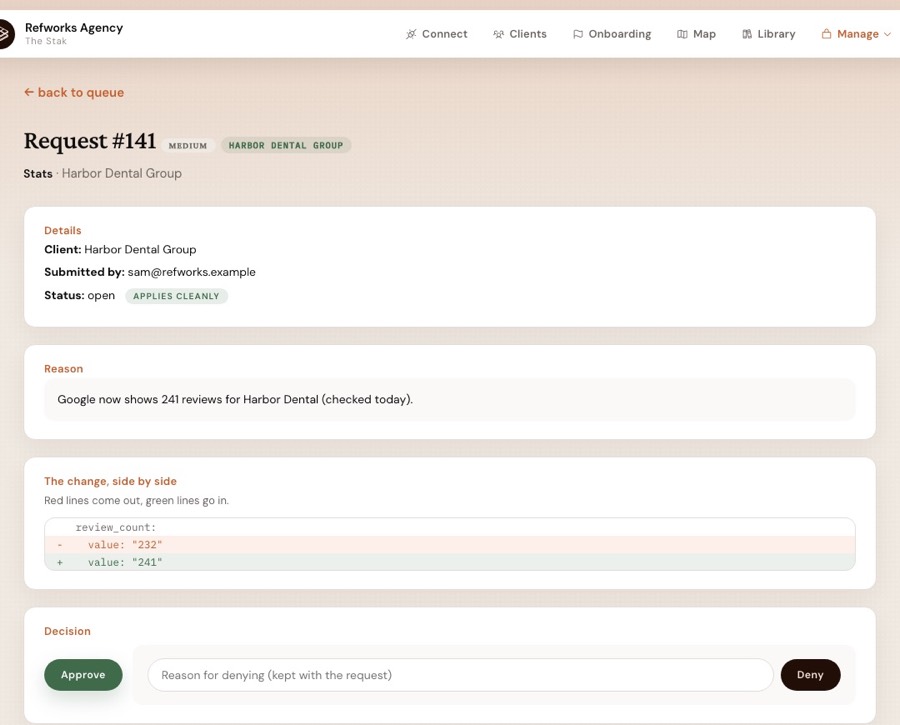
The judgment about where a change belongs is automated. The sign-off is not, and won't be. A system that writes its own canonical truth is the same failure mode in better clothes.
I could probably build it myself. I don't want to. You've clearly done a lot of work, probably spent a lot of tokens. I definitely don't want to.
When a client challenges a number or claim your team published, can you show where it came from?
This is where a document, any document, runs out.
Claude Projects, custom GPTs, Notion pages and Drive docs all do the same thing with a statistic. They state it. The number sits in a sentence with no source attached, so when the client's VP asks where the 34% came from, you're reconstructing a decision from memory and a Slack thread nobody can find.
Notion gets closest, since page history will show you when a number changed and who changed it. It won't tell you where the number came from or that anyone signed off on it being right.
Storystak handles the two cases differently. Canonical stats live as their own records with sourcing attached, and the working rule across the system is to cite the canonical stat rather than prose or memory. Narrative content, the positioning and the voice notes, carries file-level change history instead: what changed, when, who approved it.
So the numbers and claims are traceable to a source, and prose is traceable to an approver and a date. For regulated clients, this distinction matters, because the thing that gets challenged is almost always a number.
Why do two people on the same account produce different work?
Because they're reading from different copies.
Two paid-media specialists, each with their own Project or their own folder of context files, will produce different output from the same brief. Neither is being careless. They've each assembled a slightly different picture of the client, and each picture was accurate at some point.
Custom GPTs make this a little worse than Projects. Outside a Business or Enterprise workspace, one person maintains the GPT and everyone else uses whatever that person last uploaded, which is fine until that person is on holiday.
Think of the email signature problem. Three people at the same company send you three different signatures. Nobody did anything wrong. There was never one place the right one lived.
A Stak is the original rather than a copy, so when a fact changes, it changes for everyone at once, including the freelancer who joined last week.
We've tried AI, but it doesn't sound like us.
What about Claude's memory across chats and Cowork?
It fixes re-briefing for one person. It doesn't fix consistency across a team.
On 25 August 2026 Anthropic extended Claude's memory to Cowork in the cloud, so context picked up in a conversation carries into a Cowork task and back out again. Claude writes memory as individual topics while you're talking instead of summarising afterwards, and you can open Settings, read what it kept, and edit or delete any of it. That visibility is a real improvement for Claude.
The catch is who "you" means. Memory belongs to each person's account; even a Team owner can't see or edit a member's memories. Your picture of the client is yours. Your account manager builds her own. Neither of you can see the other's, and nothing reconciles them.
Two more things worth knowing before an agency leans on it. Memory accumulates from whatever got said, which includes the number that was right in March and the idea somebody floated in passing and dropped. No entry gets approved before Claude starts acting on it, and no entry carries a source. On Team and Enterprise plans it's also off by default until an owner switches it on.
A Stak makes the opposite trade. Slower to change, because a person accepts the change. Identical for everyone, because there is one copy rather than one per head.
Can you see whether anyone is actually using the AI system?
Mostly, no, and this is the problem on the list that goes most undetected.
Claude Team gives owners a detailed usage dashboard: active members, adoption, which skills and connectors get used, and spend. What it doesn't give is a picture of which client's context is being read and by whom. Custom GPTs give you very little. Drive gives you nothing useful. Notion Business adds advanced page analytics, including who edited a page, which is the strongest option of the four and still tells you about pages rather than about accounts.
The reason to care isn't curiosity. When an account has gone quiet in the system, that's usually visible weeks before it's visible anywhere else, and it's the cheapest early warning an agency owner gets about possible churn.
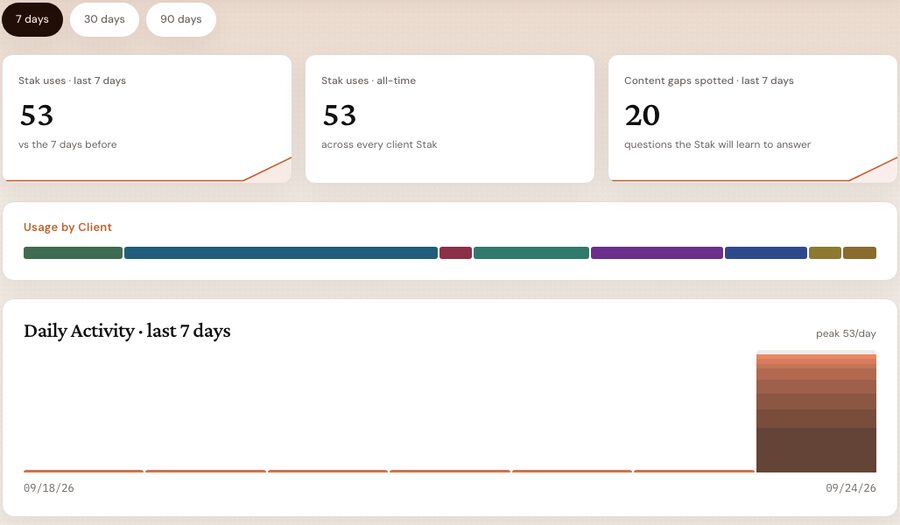
Storystak's Surface reports activity by client and by person, plus how many update requests are open and how many were closed.
How do you find out what your AI system is missing?
Every setup on this list fails silently.
Someone searches the Notion workspace for the client's stance on a competitor, finds nothing, and writes something plausible instead. The Claude Project gets asked a question its files can't answer and produces a confident, reasonable-sounding paragraph anyway (in other words, a hallucination). The gap doesn't surface until it reaches a client.
A Stak logs the search that came back empty. When the same question keeps going unanswered, it gets raised as a real gap to fill. You end up with a list of what your team needed and couldn't get, which is a more useful document than most agencies have ever had about their own accounts.
Can you let a freelancer into one client without letting them into everything?
This is the section where the general-purpose tools get genuinely awkward.
Notion's hosted MCP server operates at the access level of whoever authorised it. Their permissions are the ceiling and the server acts with their full access. Notion's admin controls for approving which AI apps may connect, auditing those connections and cutting them all off sit in the Enterprise tier. So on a Business plan, giving a contractor access to one client means setting page permissions carefully by hand, and it means their AI connection reaches as far as their account does.
Claude Team is cleaner on identity and blunter on scope. A freelancer needs a seat, and a seat sees the shared projects it's been given, which is workable if you're disciplined about project membership and awkward if you aren't.
Drive is the folder-share problem everyone already knows.
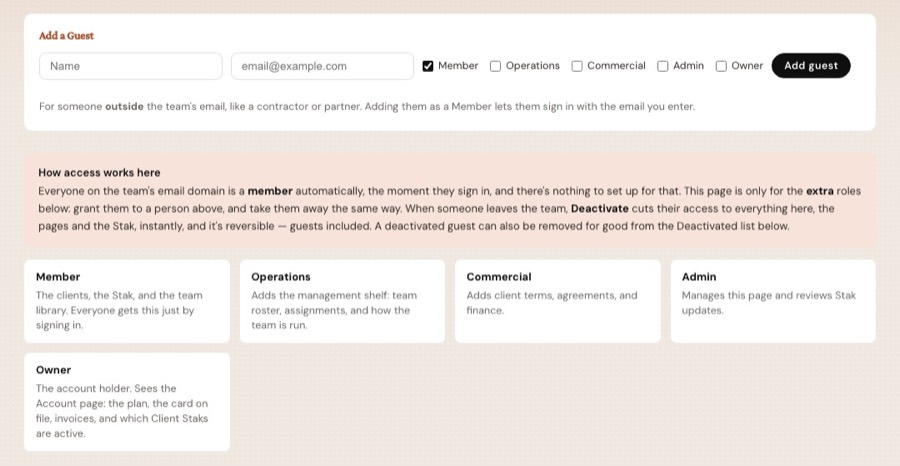
Storystak draws its walls in a different place, and it's worth being precise about which. Each client's context is walled off from every other client's, and that is enforced in code: every read names one client, so one client's facts can't bleed into another client's work, however busy the day. People are a different wall. Anyone the agency lets sign in, freelancers included, can reach every client on the roster. Roles decide which pages of the Surface they see, a freelancer costs nothing extra, and removing someone cuts their access to the pages and the Stak at once. If someone must not see a client at all, they shouldn't have a sign-in.
What does it cost when you add people versus when you add clients?
Every option here except one is priced per person.
Claude Team standard seats are listed at $20 per seat per month on annual billing, $25 monthly, with premium seats at $100 and $125. Notion Business is $20 per member per month annually, $24 monthly, and Business is the tier where full Notion AI actually lives. Notion's Plus plan at $10 gives a limited AI trial rather than the full set.
Run that for a twenty-person agency using both, and you're at roughly $800 a month before anyone builds anything. Which is fine, and probably worth it.
The part worth noticing is the direction. That number goes up when you hire and stays flat when a client leaves. Then you bring in three freelancers for a busy quarter and it's another $120 a month, so somebody decides the freelancer doesn't really need access, and now the freelancer is guessing.
Storystak is $100 a month per active client. Staff, freelancers, contractors and partners cost nothing extra, which means nobody ever has to decide whether a contractor is worth a seat. The bill moves with your client roster, which is also the thing your revenue moves with.
To be clear about what this is not: Storystak sits as a foundation for your AI tools rather than replacing them. You still pay Anthropic or OpenAI. The comparison above is about which line item grows with headcount and which grows with clients, not about swapping one bill for another.
What happens when a client tells you to use a different AI tool?
Whatever you built stays where you built it.
Client knowledge inside Claude Projects is denominated in Anthropic's roadmap and pricing. The same is true of custom GPTs and OpenAI, and custom GPTs show how fast that can move: OpenAI is now retiring them. This isn't a criticism of either company. It's an observation about a market where capability and price both move quarterly, and where a client with their own AI policy can simply tell you which tool to use next year.
Notion is better positioned than either, because its MCP server means the workspace is readable from Claude, ChatGPT or Cursor rather than from one vendor's app. That's a real advantage and Notion deserves credit for it.
A Stak connects over MCP too, which is an open standard rather than any one company's property. Bring your own AI.
What if you never built anything, and the client lives in one person's head?
This is the most common setup of all, and it's the best-performing one right up until it isn't.
The person who's been on the account since the pitch really is the fastest and most accurate source in the building. They know the client's actual objection to the mid-tier package, which stat the founder hates, and why the last campaign was pulled. It's never been written down because it's never needed to be.
Three things happen eventually. They go on vacation, and work either waits or gets done worse by someone trying their best. A new hire spends six weeks asking questions, and every question is paid for twice, once by the person asking and once by the senior person who stops to answer. Then one day they leave, a handover doc gets written in the final week, and it captures perhaps a third of what mattered.
We told an agency owner recently that we'd been through her files and everything publicly available about a client, and the information wasn't there, which meant it existed only in her head. She hadn't thought of it as a risk she was personally carrying. But it is one.
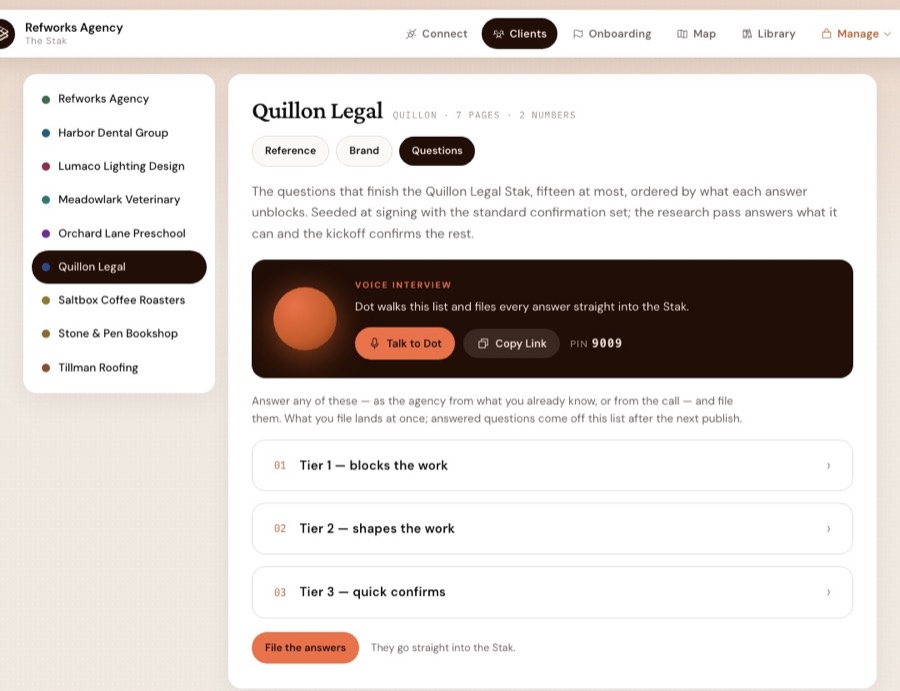
Building a Stak for an agency in this position looks different from the migration case. There's no tidy-up job, because there's nothing to tidy. The work is getting what's in someone's head into a form the rest of the team can use, and that happens through a structured interview rather than a request to write it all down. Nobody writes it all down.
What Storystak doesn't do
Everything above is easier to believe with the limits stated.
We don't watch most content age. Numbers are the exception: a canonical stat nobody has confirmed in 120 days gets flagged. Nothing tells you a paragraph is six months old and untouched until someone flags it and it's added to the queue. Somebody still has to own accuracy for each account. What changes is that owning it becomes a five-minute review rather than a documentation project you keep postponing.
We don't limit a person to some clients. Each client's content is walled off from every other client's, but anyone with a sign-in can reach the whole roster.
We don't make AI accurate. Working from an approved source cuts the error rate. It doesn't take it to zero, and anyone claiming otherwise is selling harder than we are.
We don't replace your AI tools, and we don't want to. Your team keeps using whatever they use now. It just knows the client and improves consistency.
Which AI setup should you use?
Keep your Claude Projects if you're a small team, you built them, you maintain them, and the people using them are the people who know the accounts.
Keep Notion as your workspace regardless. It's a good workspace. The question is whether it should also be the place a client's approved facts live, and for most agencies past ten people, the answer is that a workspace and a system of record want different things from you.
Keep the Drive folder if the alternative is nothing, but don't mistake a connector for a system.
Talk to us if more than a handful of people touch client work, if contractors or partners are in the mix, if clients ask where a claim came from, or if the honest answer to "where does this client's knowledge live?" is a person's name.
AI is giving everybody speed. Speed is the hook. Consistency is the part you're actually buying.
Frequently asked questions
Is Claude Projects good enough as a client knowledge base for an agency?
For one to three people, usually yes. A shared Project on a Claude Team plan puts the same documents in front of everyone and costs nothing extra. What a Project has no concept of is approval. There is no state in a Project that records that a named person reviewed a change on a date, and no report showing which clients your team is actually working on. Those absences start to matter at around six or eight people.
Can you add a Google Doc to a shared Claude project?
Not as of September 2026. Google Drive files can be added to private projects, where they sync from Drive so the copy stays current, but the option is disabled for shared projects. A team working from a shared client project is reading uploaded files, which somebody has to replace by hand every time the source changes.
Is Notion good enough as an agency client knowledge base?
Notion is an excellent workspace and a weak system of record. Anyone can edit any page, which is what makes it fast, and it means no page carries a record of who approved its current contents. Full Notion AI also requires the Business plan at $20 per member per month billed annually, so the cost grows with headcount rather than with the client roster.
How do you give a freelancer client context without giving them everything?
In most DIY setups you either build them a folder by hand or accept that they can see more than they should. Notion's hosted MCP server operates at the access level of whoever connected it, and the admin controls for approving and auditing AI app connections sit in the Enterprise tier. Storystak walls each client's context off from every other client's in code, but it doesn't limit a person to some clients: anyone who signs in can reach the whole roster. What it does solve is the seat and the exit. Pricing is per active client rather than per seat, so adding a freelancer does not change the bill, and removing them cuts their access at once.
What does Claude Team cost for an agency?
Claude's published pricing lists standard Team seats at $20 per seat per month billed annually, or $25 billed monthly, with premium seats at $100 and $125. The relevant point for an agency is that the number is per person, so it rises when you hire and does not fall when a client leaves.
What does Storystak cost?
$100 a month for each active client, billed on the 1st, with unlimited seats and no setup fee. Staff, freelancers and contractors cost nothing extra, so the bill moves with your client roster rather than your headcount. You keep paying for your AI tools; Storystak doesn't replace them.
Should a marketing agency build or buy an AI client context system?
Build it if one person maintains it and that person does most of the client work. Buy it when the people producing the work are not the people who built the system, when a client can challenge a claim you need to stand behind, or when the maintenance keeps landing on whoever has the least free time.
Does Claude's memory across chats and Cowork replace a client knowledge base?
It removes re-briefing for one person, not inconsistency across a team. Anthropic extended memory to Cowork in August 2026, but memory belongs to each person's account, and even a Team owner can't see or edit a member's memories, so each person accumulates their own picture of a client. Entries also accumulate from conversation without approval or a source attached, and on Team and Enterprise plans memory is off by default until an owner enables it.
Sources
- Claude plans and pricing: claude.com/pricing and What is the Team plan?
- Sharing Claude projects: Manage project visibility and sharing
- Google Docs in projects: Use Google Workspace connectors
- Claude memory: Using Claude's chat search and memory and Claude release notes
- Claude Team analytics: View usage analytics for Team and Enterprise plans
- Custom GPTs: Creating and editing GPTs and Sharing and publishing GPTs
- Notion plans: notion.com/pricing
- Notion MCP: Notion MCP

Dan works with agency owners on how their teams use AI day to day, and on what it takes to make that work consistent across people, clients and tools.