
On this page
- How do you know if your agency has outgrown it?
- What does "Obsidian with AI" mean in 2026?
- What does Obsidian offer a team now?
- Where does Obsidian with AI work well for an agency?
- Where does it fall short as the place a client's facts live?
- Is anyone using it, and who is behind it?
- The short version
- Can you use both?
- What Storystak doesn't do
- Which should you use?
- Frequently asked questions
- Sources
Facts checked . The products compared here change often; we re-check every 30 days.
The short answer: it is the right setup if the vault is yours, or belongs to a small team that is comfortable working in files and a coding tool. Keep it.
It stops being the right setup when any of these is true: more than one person works an account, a freelancer touches client work, part of the team uses an AI in a browser or on a phone instead of a coding tool, or what the AI says about a client ends up in front of that client. At that point you need four things a vault doesn't require of anyone: a named person approving a change before everyone's AI reads it, a source on every number, a freelancer's AI limited to their clients, and a report of what the team asked for and couldn't find. You can build most of the way there with Git and some careful setup, and this page shows how. Someone then has to keep it running, for every client, as people and facts change. At most agencies that someone is the owner.
Obsidian is a notes app built around one person's folder of files. A client's approved facts, read by a whole team and their freelancers, need an approver, a source and a guest list.
Storystak, which publishes this guide, is the other option on this page. It is a client context layer for agencies: one approved AI knowledge base per client, called a Client Stak, that every AI your team uses reads over MCP. Every fact carries its source, and a person approves every change. It isn't an AI assistant and it isn't a notes app, and an owner who loves their vault can keep it.
How do you know if your agency has outgrown it?
Run these five checks on your own vault. They tell you more than this page can.
- Ask the same question from three laptops. Pick one client and one fact that matters, like the current price of their main offer. Have three people ask their AI, each on their own machine and in their own words. Count the different answers, and check whether all three were even reading the same copy of the vault.
- Trace one number. Take a number from a client note. Find where it came from and who last confirmed it. If the AI wrote the note from a transcript, find the line in the transcript.
- Set up a freelancer. Give a freelancer what they need to work on one client with their own AI. See what you ended up handing over: the whole vault, a copy of a folder, or a paste.
- Change a fact through the AI. Tell it to update a client's note. See who was asked first, who was told afterward, and how long it took to reach everyone else's copy.
- Ask for something that isn't there. Ask for a client's position on something the vault doesn't cover. See whether the AI says so or writes something plausible, and whether anyone who maintains the vault finds out.
If all five come back clean, you don't need anything else on this page. If one doesn't, fix that one. If two or more don't, the rest of this page is about why, and what it takes to close each one.
What does "Obsidian with AI" mean in 2026?
It means a folder of plain text notes on your computer, with an AI working directly in that folder. Obsidian calls the folder a vault. Every note is a Markdown file you own, and Obsidian is the app you read and link them in.
The setup we see most often looks like this:
- a folder for each client, holding the brief, brand notes, contacts and meeting notes
- a raw folder where call transcripts and exports land, and a wiki folder where the AI writes them up as tidy notes
- an instructions file at the top of the vault telling the AI how the vault is laid out and how the agency likes work done
- an AI coding tool such as Claude Code, Codex or Cursor, opened in the vault folder, so "pull up everything on Fernhill Outdoor" works without pasting anything
(Fernhill Outdoor is a client we made up for this page.)
The idea is sound, and it has spread fast. CXL published a full guide for marketers in July 2026 on building exactly this. Its rule of thumb is Obsidian for a personal system that one person owns and maintains, and GitHub once a team works in it together. It also carries the best warning we've read about the approach: the memory compounds, and so do the mistakes in it.
One owner and one vault is the shape it fits best. An agency has a harder version of the problem, because it keeps this kind of record for every client at once and lets different people into each one.
What does Obsidian offer a team now?
More than a notes app usually does. As of November 2026, Obsidian documents all of this:
- The app is free, with no account needed. A commercial license is optional at $50 per user per year, and Obsidian says you are not required to buy one.
- Sync. Obsidian's own sync service is $4 per user per month billed yearly on Standard (one synced vault, one month of version history) and $8 on Plus (ten synced vaults, 12 months of history). It is end-to-end encrypted.
- Shared vaults. A vault owner can invite up to 20 collaborators into a synced vault. Each one needs their own Sync subscription.
- Version history. Obsidian keeps earlier versions of each synced note, and the Sync history on desktop shows who last edited a file.
- A command line and Skills. Since version 1.12, Obsidian ships an official command line that can do what the app can do, with the app running. It also publishes official Skills, which are instructions that teach AI tools how a vault works.
- Other ways to share. Because a vault is just files, Obsidian points out that teams can also share one through Git, Dropbox, Google Drive or a network drive.
What Obsidian does not ship is an MCP server of its own. (MCP, the Model Context Protocol, is the open standard AI tools use to connect to outside sources.) The usual ways to connect an AI are a community plugin, the command line, or a tool that reads the folder directly, and they run on the computer where the vault sits. Putting a vault on a server is possible, with Obsidian's headless sync (in open beta) or a Git host, and then someone runs that server.
Notice what the list is made of: files, and ways to copy files between machines. None of it knows what a client is, who should approve a change, or which AI just read what.
Where does Obsidian with AI work well for an agency?
You own the files. Plain Markdown in a folder on your disk. No vendor can change the price of your client notes or hold them. If Obsidian disappeared tomorrow, every note would still open.
It is private by default. The notes stay on your disk unless you sync them, and Obsidian's own sync is end-to-end encrypted. What your AI reads goes to the AI's provider, as it does with any setup.
AI coding tools are very good in it. A coding tool reading a local folder is fast and can follow links between notes. For one person who lives in it, this is one of the best AI setups there is.
It costs almost nothing. The app is free. A full team on Sync costs less than a round of coffee per person each month.
It isn't tied to one AI. The files don't care which tool reads them.
If the vault is yours alone, or you are a small team that already works in Git and a coding tool, stop here and keep what you have.
Where does it fall short as the place a client's facts live?
In the places where one person's notes and a team's record of approved facts want different things. Each of the five checks above maps to one of these.
Can anyone change a client fact?
Yes. Anyone with the vault can edit any note, and so can the AI acting for them. With Obsidian Sync the edit reaches everyone else's copy the next time they sync, and nobody is asked first. Two people editing the same note at once are merged when they sync, with no live co-editing.
Out of the box, the tools that connect an AI can read, write and delete notes. The guides that explain them say to keep the vault in Git or a backup for that reason. Some coding tools can be told which folders they may not write to, on each machine where someone sets that up.
Git is the real answer here, and it works. Put each client's folder in a repository, have every change arrive as a pull request, and name a reviewer. Engineering teams run shared vaults this way. Nobody has to learn the commands, because they can tell the AI to open the pull request. Somebody does have to own the repositories, the reviewer rules and the write limits, and fix them when they break. If you already run a coding tool in a private repository, that somebody is you.
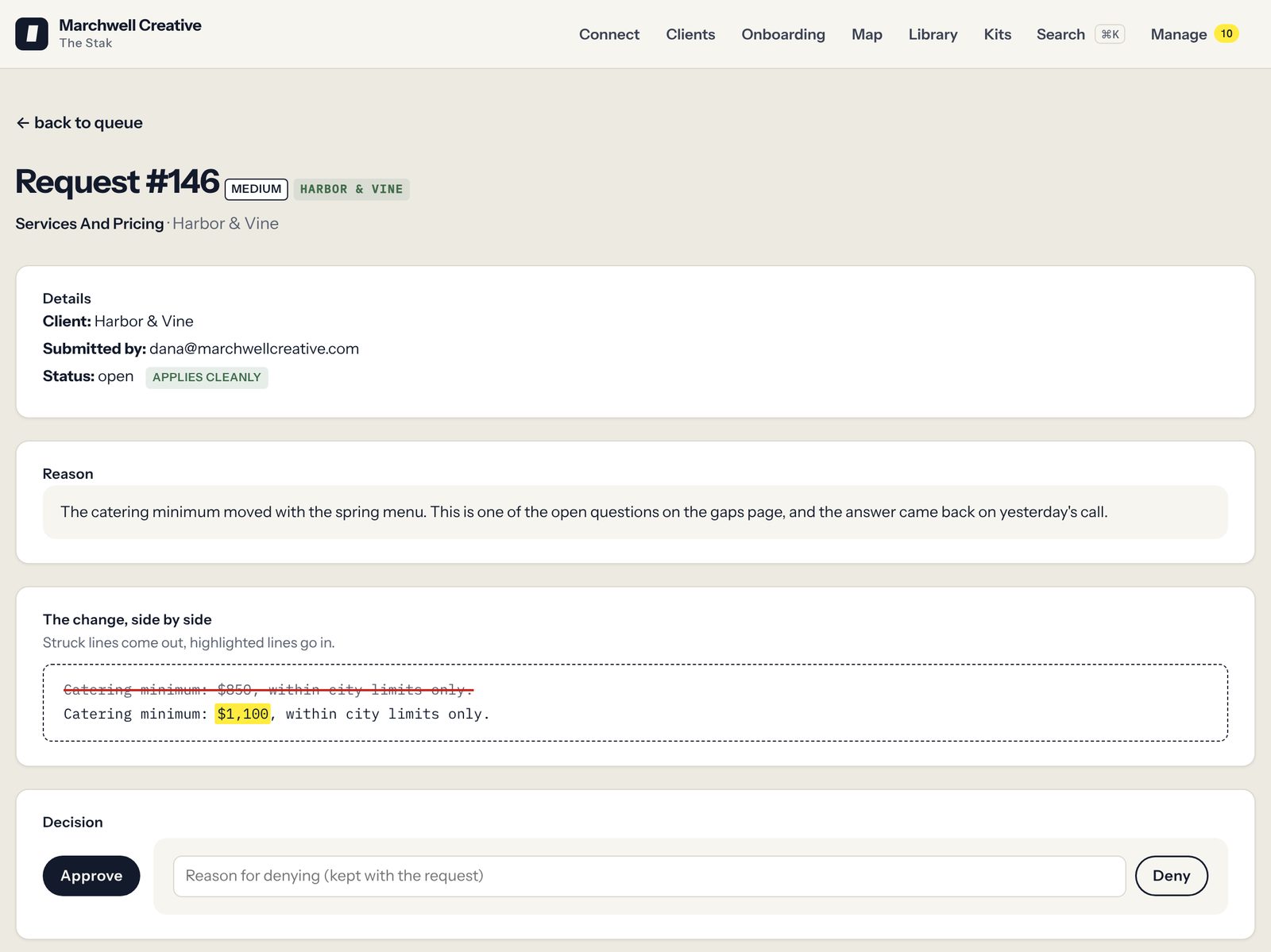
In a Stak nobody edits the record directly. A change is a request: who raised it, what it touches, the reason, and the old and new lines side by side. A person named for that client approves or denies it, and every approval is logged. That is the governance in a Stak. The cost is speed: a change waits for that person, so an agency needs more than one approver per client to cover time off.
Does a number carry its source?
Only if you build it. A note states that Fernhill has 212 dealers. Version history can tell you who last edited the file. It can't tell you where 212 came from or that anyone checked it.
The raw-and-wiki pattern makes this harder, not easier. The AI reads a transcript and writes a clean summary note. The next person's AI reads the summary, not the transcript. A number that was misheard, or was a guess on the call, is now in a tidy note that looks checked. Careful vault owners keep one facts note per client, tell the AI to link every claim back to its raw file, and add a checked-on date that a scheduled job can read. That is a good build. It holds for as long as everyone, and everyone's AI, follows the convention, and nothing stops a note that doesn't.
A Stak keeps numbers as their own records, each with a source attached, and flags any number nobody has confirmed in 120 days.
Can a freelancer get one client and only that client?
This is the hardest one for agencies. Obsidian's documentation says it plainly: "Fine-grained permissions are not supported yet." Every collaborator in a shared vault gets the same permissions as the vault's owner, except that only the owner can invite people. Sharing is by the vault, so one client's folder can't be shared out of a larger one.
Per-client access therefore means a separate vault or a separate repository for each client. That works, and CXL's guide suggests the same thing for clients with different confidentiality needs. A freelancer doesn't even need Obsidian: a private repository or a shared Drive folder for that one client will do. It also changes what you are running. The instructions file has to be kept up in every one, someone grants and removes access client by client, and an owner who wants to ask a question across clients now has 18 folders.
Then there is the copy. However you share it, the freelancer ends up with the files on their laptop. When the project ends you can remove their access, and the updates stop. What they already have stays where it is.
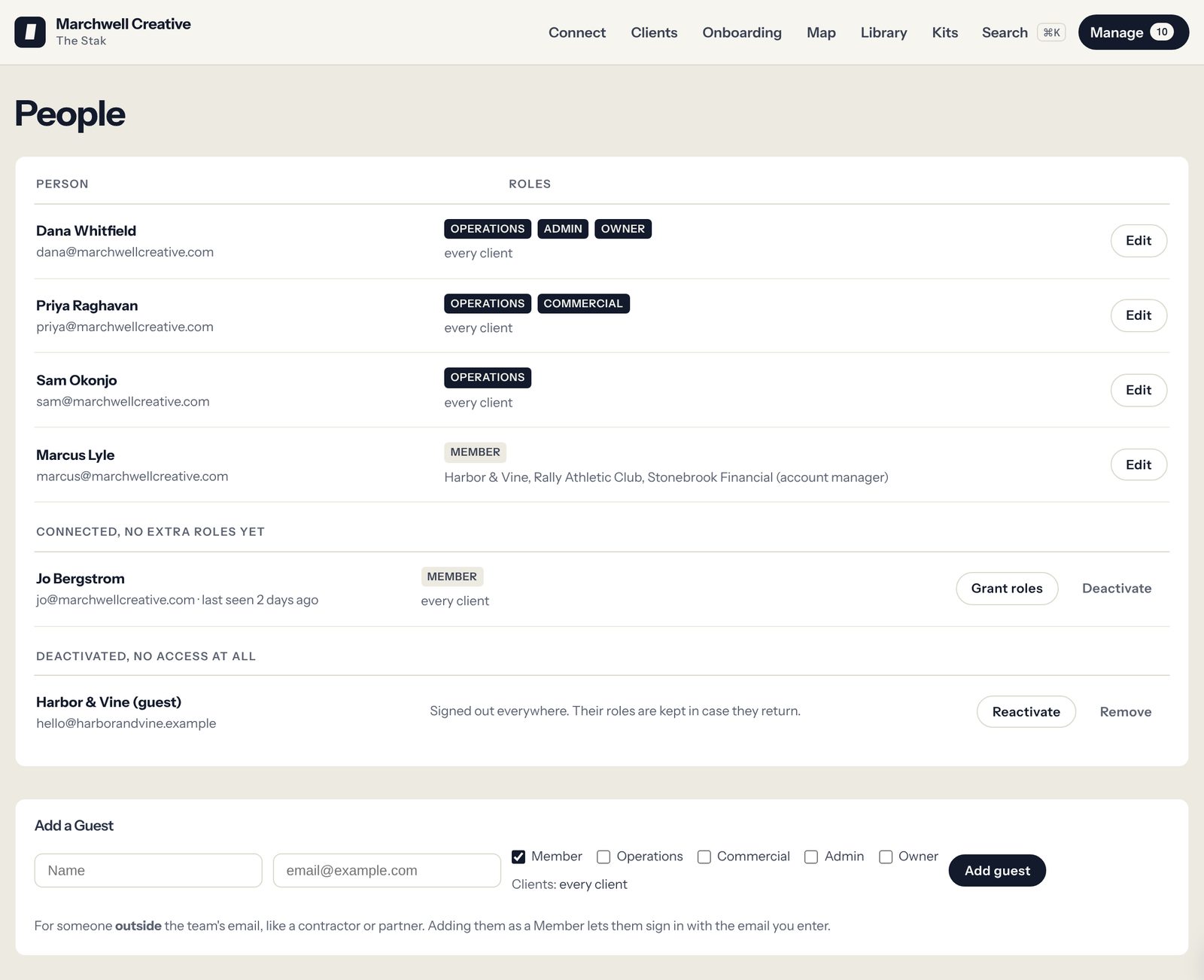
In Storystak every read names one client, and each person is assigned to the clients they work on. A contractor on two accounts reads those two and nothing else, adds nothing to the bill because pricing is per client, and is cut off the moment someone deactivates them. To be fair to both sides: whatever their AI already read is in their chats and drafts in either setup. The difference is that there was never a folder of the client's files on their laptop.
Can everyone's AI reach it?
Only the people set up for it. The usual connection lives on each person's computer, so each person needs the vault synced locally and an AI tool that can read local files: Claude Code, Codex, Cursor, or a desktop AI app with a local server added. Each of those is an install, and some need Obsidian open and a key pasted into a settings file.
The owner who built the vault did all of that once and forgot it was work. For the account manager who uses Claude or ChatGPT in a browser or on their phone, Obsidian offers no official way in. There are workarounds. If the vault is in GitHub or Google Drive, some AI apps can be pointed at a copy of the files as a project. A paid community plugin offers a remote connection that works while Obsidian is open on a computer that stays awake. Each is one more thing to set up and keep working. What usually happens is simpler: they ask the owner, or they paste.
A Stak is a hosted connection. Each person signs in once from the AI they already use, Claude or ChatGPT, in a browser or an app, and there is nothing to install or keep in sync.
Does everyone's AI get the same answer?
Often not, for two reasons. Inside one vault, what's true about Fernhill is spread across notes of different ages: the current brief, last spring's kickoff notes, a meeting summary. The AI searches and reads what comes back, so two people asking slightly different questions can get different notes and different answers, each delivered with the same confidence.
And there is more than one copy. Each person reads their own copy. If someone's laptop hasn't synced, or they haven't pulled the latest from Git, their AI is reading last week.
A Stak holds one current version of each fact for a client, in one place. Old versions sit in the change history, not next to the live one, so the person writing ad copy and the person writing the monthly report start from the same approved facts.
Can you see what the team asked for and couldn't find?
No. When the AI searches the vault for Fernhill's stance on a competitor and finds nothing, it may say so, or it may write something plausible. Either way nobody who maintains the vault is told the note was missing. The searches happen on each person's own machine, and nothing collects them. There is also no view of which client's notes are being used, or by whom.
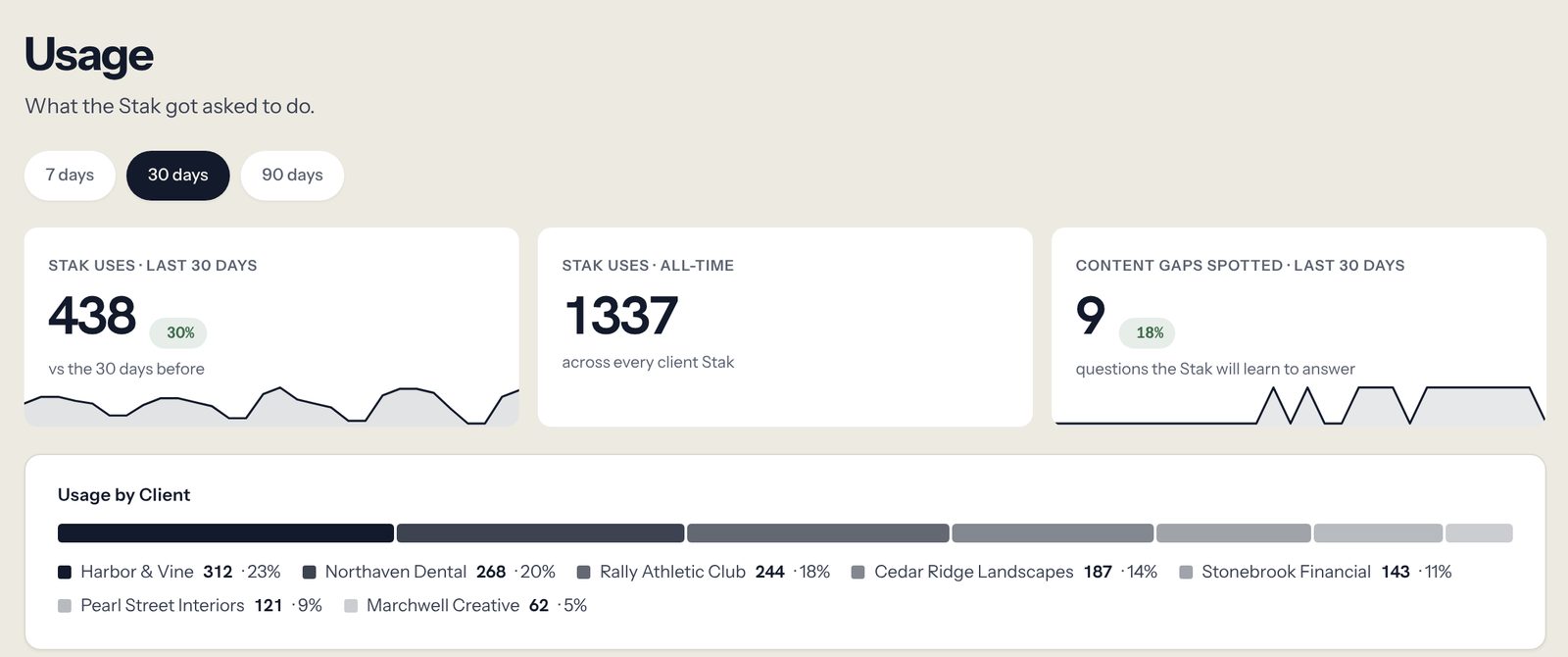
A Stak logs the search that came back empty, and reports activity by client and by person.
What does one wrong fact look like in each?
Take one ordinary week. On Tuesday's call, Marco at Fernhill says the Ridgeline tent goes from $349 to $389 on the first of the month.
In the vault. The transcript lands in the raw folder. The Fernhill offer note still says $349, because nobody was asked to change it, and the AI that summarized the call wrote a new meeting note without touching the old one. The following week a freelancer, working from the folder copy they were sent in September, drafts the launch ads at $349. Or an account manager asks the AI, and the search returns the offer note, not the meeting note. Either way the ad says $349, and the first person to notice is Marco. Afterward someone fixes the note. Nothing in the vault shows who should have, and the same thing can happen with the next fact.
In a Stak. The account lead, or anyone assigned to Fernhill, files the change from the conversation they are in: old price, new price, the reason, the call as the source. The person named for Fernhill approves it. From then on every AI on the account reads $389, the freelancer's included, and the record shows who changed it, who approved it and why.
The honest limit: someone still has to file that change. A Stak doesn't listen to your calls. What it changes is that there is one place the price lives, anyone on the account can raise the correction, a named person answers for it, and a number nobody has confirmed in 120 days gets flagged.
What does each one cost?
Obsidian is priced per person, and barely. Storystak is priced per active client. On dollars alone Obsidian wins every time, so the real question is what someone has to keep doing.
Obsidian. The app is free. Sync is $4 per user per month on Standard and $8 on Plus, billed yearly. The commercial license is optional at $50 per user per year.
Storystak. You pay for each active Client Stak, meaning one that is switched on. There are two ways to pay:
- Month to month: $100 a month for each, plus a $1,500 one-time setup that we are waiving for founding agencies.
- By the year: $75 a month for each, with at least five prepaid at signing ($4,500), setup included and the price locked for 24 months.
Seats are unlimited, contractors included.
Here is a worked example: an agency of 14 people with 18 retained clients and four regular freelancers.
| What it costs | What someone has to keep doing | |
|---|---|---|
| A vault per client on Obsidian Sync | 18 Sync seats (14 staff and four freelancers), two of them on Plus to own the client vaults (joining a shared vault doesn't count against a person's own limit): about $80 a month | Invite and remove people vault by vault. Keep an AI tool that reads local files working on each computer. Review what the AI changed, after it changed it. |
| The best build: a repository per client | A Git host and the AI plans you already pay for. Close to nothing. | Own 18 repositories and who can reach each. Keep the reviewer rules, the write limits, the facts note and its checked-on dates, and the instructions file working in all of them. Keep a project copy current for people who work in a browser. Be the person everyone calls when it breaks. |
| Your vault plus one Stak | Your current setup, plus $100 a month, month to month | File changes as they come up, and approve or deny them, on that one client. |
| Your vault plus five Staks | Your current setup, plus $375 a month ($4,500 for the year) | File changes as they come up, and approve or deny them, on those five clients. Approving is a yes or a no on a change someone else wrote up, and there is no limit on changes. Freelancers on those accounts are assigned in Storystak at no added cost. |
| Your vault plus all 18 Staks | Your current setup, plus $1,350 a month by the year | File changes as they come up, and approve or deny them, shared across your account leads. |
The second row is the one to take seriously. It is nearly free, it gives you a real approval step and per-client access, and if you have someone who enjoys running it, it is a good answer. Here is what it still leaves open after you have built all of it:
- People who use an AI in a browser or on a phone depend on a copy someone keeps current, or are outside it.
- Nothing reports what was asked and not found. The searches happen on each person's machine.
- A copy can't be taken back. Removing access stops updates and leaves the files.
- The source and the checked-on date are conventions. A note that skips them looks the same as one that doesn't.
- It has one maintainer. At most agencies of this size that is the owner, who built it and is the only one who fully understands it. The rest of the team's access to client facts depends on that person's spare time.
The third row is where we'd start. Pick the one account where a wrong fact costs the most: the one with freelancers on it, prices and offers that change, claims a legal team has ruled on, or a client who has asked how you use AI. It is $100 a month with no yearly commitment. You can move to the yearly plan whenever you are ready, and that is when the fourth row makes sense. The last row is there for scale. Nobody needs to start there.
A Client Stak is $75 to $100 a month, against close to nothing for the vault. What you are buying is the upkeep in the right-hand column done by a product instead of by you, for the accounts where a wrong price in an ad costs more than that.
What the price covers, beyond the record: we set up each Client Stak with you, drafted from the files and calls you already have, with a source on every fact, and your team reviews it before it goes live. Then we work through a real task with someone on your team.
Is anyone using it, and who is behind it?
One agency owner's account, in her words. She runs an independent agency with four account managers and 30 to 35 clients. Every client report used to mean checking the facts in it by going back through documents, or by asking her. She "used to dread the first of the month because of reporting." She gave the team one rule: "Before you come to me, ask the Stak first." The next month: "I got no emails, text, or phone calls." By her own estimate in October 2026, a client report went from between 45 minutes and two hours to under 10 minutes.
That is not an Obsidian story, and it is one agency. But the starting point is the one a vault tends to produce: the person who built the record holds the answers, and everyone else asks them. Now her team checks against one approved record that all of them can reach from their own AI.
Storystak is a new company, founded in 2026 by two people who spent their careers in agencies and marketing teams. You can read who we are on the about page. The agencies that sign on in these first months are founding agencies. They work with us directly, setup is included, the price is locked for 24 months, and they have a say in what we build next. The fine print is on the public price list.
On where client content is stored and who can process it, don't take a summary from us. The security overview, the subprocessor list and the data processing addendum are public. In short: each client's record is walled off from every other client's, nothing is pooled across agencies, and your content isn't used to train AI models. Storystak itself has not been audited or certified, and the security overview says so. One thing a local vault does that a hosted record can't: keep everything on your own disk. If that is a hard requirement from a client, the vault is the right home for that client.
The short version
| An Obsidian vault + AI | A Client Stak (Storystak) | |
|---|---|---|
| How a fact changes | Anyone with the vault edits the file, or their AI does | Anyone requests, a named person approves |
| Where a number came from | Whatever the note said | A record with its source attached |
| When it's out of date | A checked-on date, if you built one and people fill it in | Numbers flagged after 120 days; the rest needs a person |
| What the AI reads | Whatever the search returns, from that person's copy | One approved record for that client |
| Who can connect an AI | People with the files on their computer and a tool that reads them; workarounds for the rest | Anyone you assign, from Claude or ChatGPT, after one sign-in |
| One client only, for a freelancer | A separate vault or repository per client; a shared vault gives everyone the owner's permissions | No added cost, assigned to just their clients |
| Cutting off one person | Remove their access; their copy stays with them | Deactivate them on the People page |
| What was asked and not found | Not reported | Empty searches logged |
| Who is using it | Not reported | Activity by client and person |
| Where it lives | Your own disk, as files you own | Hosted; export on request at no fee |
| Cost grows with | People ($4 to $8 a seat for Sync) | Active clients ($100 each, or $75 by the year) |
Can you use both?
Yes, and for an owner who thinks in their vault it is what we'd suggest.
Keep the vault for your own thinking and the work in motion: research, meeting notes, ideas, drafts, your reading. Put in the Stak what the team's work gets built on: the client's approved facts, prices and offers, voice, claims the client's legal team has ruled out, who's who, and your agency's own way of working.
Moving a client across is what a Stak is built for. Connect the AI you already run in the vault to the Stak as well, and ask it to go through that client's folder. It identifies what is there and copies it into the right places in the Stak as change requests, and a named person approves them. How long it takes depends on how fast your AI model is and how much there is to move. A large record is usually about half an hour for the AI's part, and then the approvals are yours.
The risk with two homes is two copies. Pick one home for each kind of fact. When a client's prices and positioning move into the Stak, take them out of the vault note and leave a line saying where they live now. Your notes from this morning's call stay in the vault.
What Storystak doesn't do
It isn't a notes app. There is nowhere to think out loud, link ideas or keep a daily log, and it won't replace your vault.
It doesn't live on your disk. It is a hosted service. If you leave, you can ask for an export of every client's record at no fee.
It isn't an AI assistant. Your team keeps using Claude or whichever AI they prefer. Claude and ChatGPT connect today.
It doesn't watch prose age. Numbers get flagged after 120 days. A paragraph about the client's tone stays as written until someone raises a request.
It doesn't control access file by file. A person assigned to a client can read all of that client's Stak.
It doesn't make AI accurate. Working from approved facts means fewer wrong ones to catch. There will still be some.
And it is slower to change than a note, because a person has to approve.
Which should you use?
Keep Obsidian with your AI if the vault is yours alone, or your team is small, works in a coding tool every day, and nobody outside it needs access. If you share it, put each client in its own repository, review changes before they merge, and tell the AI to link every number to the raw file it came from.
Add a Stak for the account that matters most if two or more of the checks didn't come back clean. That usually means freelancers or partners on client work, account managers who can't reach the vault from the AI they use, or every client question still coming back to the person who built it. Start with one client, month to month, and leave the vault exactly where it is. Move to the yearly plan when you are ready.
Put the whole roster on Staks when clients start asking what your AI works from and who checked it. In the WFA's 2026 survey of major brands, 59% had put AI clauses in their agency contracts, and the answer is easier when it is the same for every client. We cover those questions, with the source, in What to tell a client who asks how your agency uses AI.
See it before you decide. Take the demo tour on a fictional agency. When you want to try it on a real account, book a call and we'll build one Stak from what you already have, month to month, and connect it to the AI your team uses.
Frequently asked questions
How do I know if my agency has outgrown an Obsidian vault?
Run five checks: ask the same client question from three laptops and compare the answers, trace one number to its source, set up a freelancer on one client and see what you handed over, change a fact through the AI and see who approved it, and ask for something the vault doesn't cover. If two or more don't come back clean, the setup needs an approval step, sourced numbers and per-client access that a vault doesn't require of anyone.
Is Obsidian a good knowledge base for AI tools?
For one person, yes, and it is one of the best. The notes are plain Markdown files on your own disk, and a coding tool such as Claude Code can read, search and edit them directly. For an agency team the limits are approval, sourcing and access: anyone with the vault can change any note, facts carry no source, and a shared vault gives every collaborator the owner's permissions.
Can a team share an Obsidian vault with different permissions for different people?
Not within one vault. As of November 2026, Obsidian says fine-grained permissions are not supported: every collaborator in a shared vault gets the same permissions as the owner, apart from inviting people. Each collaborator needs their own Sync subscription, and a shared vault holds up to 20. To separate clients you create a vault per client.
Does Obsidian have an official MCP server?
No. As of November 2026, Obsidian ships an official command line, which needs the app running, and official Skills that teach AI tools how a vault works, and no MCP server of its own. AI tools usually connect through a community plugin, through the command line, or by reading the vault folder directly, on the computer where the vault is stored.
Can I use Obsidian and Storystak together?
Yes. Keep the vault for your own notes and work in motion, and use a Stak for each client's approved facts, with one home for each kind of fact so there are never two copies. The AI you run in the vault can connect to the Stak too, and can move a client's folder across as change requests for a person to approve.
What is a client context layer?
A client context layer sits between what an agency knows about a client and the AI tools its team uses. It is one approved record per client that every AI reads, with a source on each fact and a person approving each change. It does the job of an AI knowledge base, with rules about who can change it and who can read it. Storystak's version is called a Client Stak. An Obsidian vault can hold the same information; it doesn't require the approval or the source, and each person reads their own copy.
Sources
- Obsidian pricing and the commercial license: obsidian.md/pricing
- Sync plans, vault limits and version history: obsidian.md/sync
- Shared vaults, collaborators and permissions: Collaborate on a shared vault
- Sync for teams and other ways to share a vault: Obsidian Sync for teams
- Version history: Version history
- The official command line, Skills and headless sync: Obsidian CLI, Skills, Headless Sync
- Ways to connect an AI, and what rights they give it: Obsidian MCP decoded: 3 ways to wire it, Eugeniu Ghelbur, updated November 9, 2026
- The vault pattern for marketers, and who it suits: How to Build an AI Second Brain for Marketing With Obsidian and Claude Code, Tarek Reslan, CXL, July 28, 2026
- A paid community plugin with a remote connection: Connect Pro, getting started with Claude
- A team sharing a vault through Git and pull requests: Building a second brain for AI, Talha Asif, July 13, 2026
- Owner's account and report times: storystak.com, proof. The owner's own estimate, October 2026.
- Storystak legal pages: security overview, subprocessors, DPA, price list

Dan works with agency owners on how their teams use AI day to day, and on what it takes to make that work consistent across people, clients and tools.